How to add a workshop and/or the Teaching Institute to your APS 2026 Convention Registration after you’ve already registered:
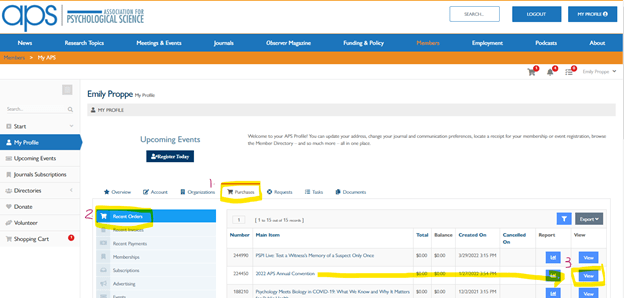
- On your APS Profile, select the ‘Purchases’ tab. (To access your APS Profile, select “LOG IN” in the top right of any page on the APS Website, then select “My Profile” in the top right corner of the screen)

- Select the ‘Recent Orders’ tab on the side menu, and click ‘View’ next to the 2026 APS Annual Convention.
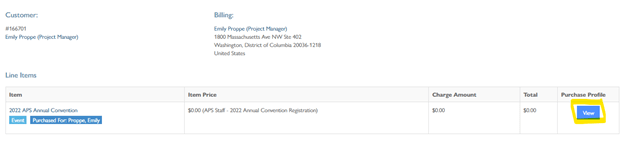
- On your Order, in the Line Items section, click ‘View’ on the Purchase Profile.
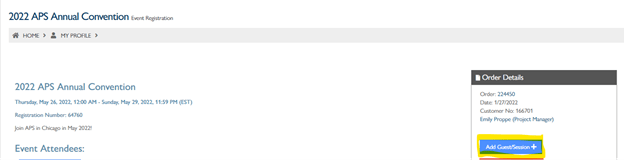
- Once on the Purchase Profile, in the ‘Order Details’ box, click ‘Add Guest/Session’.
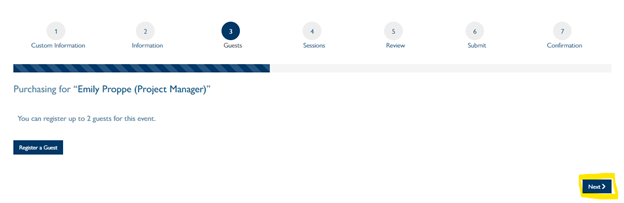
- Then click next (bottom right) to bypass the “add guest” page
- On the next page, select the workshop you are interested in attending and/or the Teaching Institute from the sessions list to add it to your cart. Scroll to the bottom of the page and click Next.
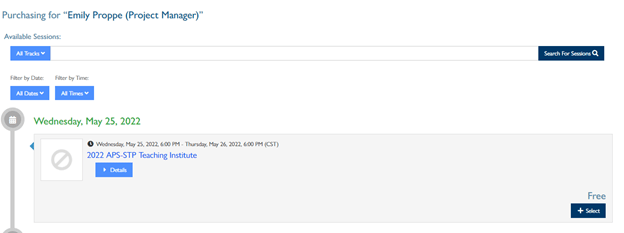
- You will then see the workshop(s) and/or Teaching Institute that you have added to your card. Click checkout to add payment information and submit your order.