APS 2026 Online Program
Thank you for making APS 2026 a huge success!
We hope to see you at the 2027 APS Annual Convention in Seattle, Washington, 27–30 May 2027.
Saving Sessions and Building Your Schedule
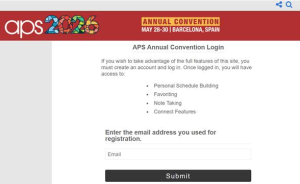
To create a personal schedule, favorite sessions, and access other personalized features, you will need to create a free in-app account.
To create an account:
- Open the Online Program and enter your registration email address.
- You will be prompted to create an account.
- Once your account is created, sign in to access all Online Program features.
Note: Your Online Program account is separate from your APS membership account and your submission account. Creating an Online Program account does not affect your membership, registration, or submission status, and your membership or submission login will not work in the Online Program system.
Browsing the Schedule
You can view the full convention schedule without an account — no login required to explore sessions, speakers, and program details.
Troubleshooting Tips
If the Online Program is not displaying correctly or showing outdated information, try clearing your browser cache or switching internet browsers.
To clear your browser cache:
- Press Ctrl + Shift + Delete (Windows) or Cmd + Shift + Delete (Mac)
- Select Cached images and files
- Click Clear data
- Refresh the page and try again
Online Program Link
You can also access the convention schedule through the Online Program by pasting the below link into your prefered internet browser:
https://psychologicalscience.confex.com/psychologicalscience/2026annual/meetingapp.cgi