Presenter Instructions
Please see the links below for more information on presenting at the APS Global Summit as a Poster Presenter or a Video Roundtable Presenter.
Video Roundtable Presenters
Organizers and Co-Presenters should log into your Video Roundtable Room at least 10 minutes before your session. APS will open the room 15 minutes prior to your Roundtable Session timeslot.
Please follow the instructions below to join your video roundtable session and give your presentation.
Finding Your Session:
1. 10 minutes prior to your session, log in to the Event Platform, using the link sent to the email on your APS profile or the APS website.
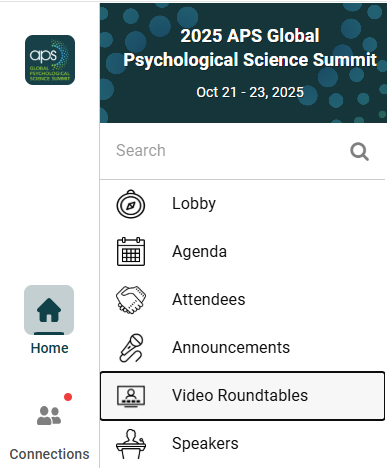
2. Navigate to the Video Roundtables feature.
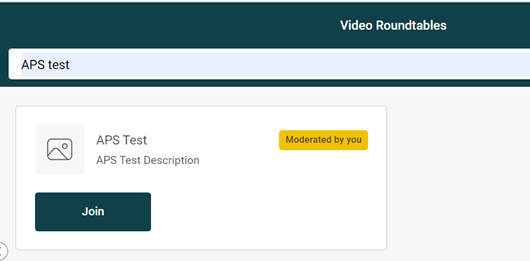
3. Once in the Video Roundtables feature, search for your Roundtable Session title. As an organizer or co-presenter, you will see a yellow button in the right-hand corner that says “moderated by you“.
Joining the Session
1. Please review the following Video Roundtable Room rules before clicking ‘Join’:
- A maximum of 25 attendees can join the session, in addition to the organizer and co-presenter, for a total 27 attendees.
- Organizers and Co-Presenters are responsible for monitoring the chat, presenting their research, and facilitating the discussion.
- Organizers and Co-Presenters can share their screen to display presentation materials.
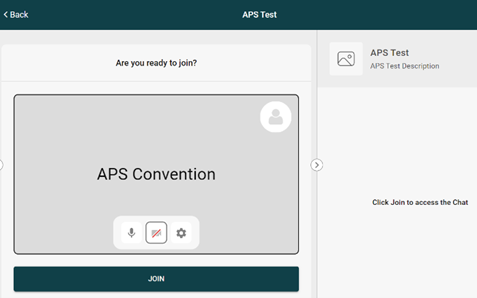
2. Click Join, and you will see the following screen:
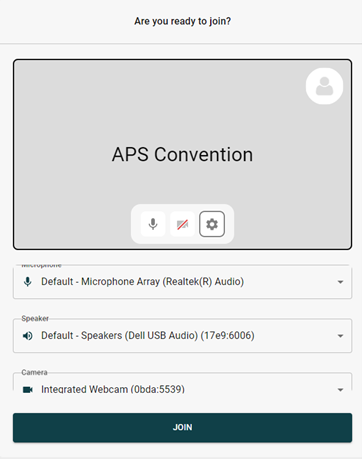
3. Next, click on the ‘Settings’ Icon to select the correct Microphone, Speaker, and Camera for your device, as seen below:
4. Once you are ready to join the session, click the ‘Join’ button.
5. You are now in the Roundtable Session Room, which should look like the below image:
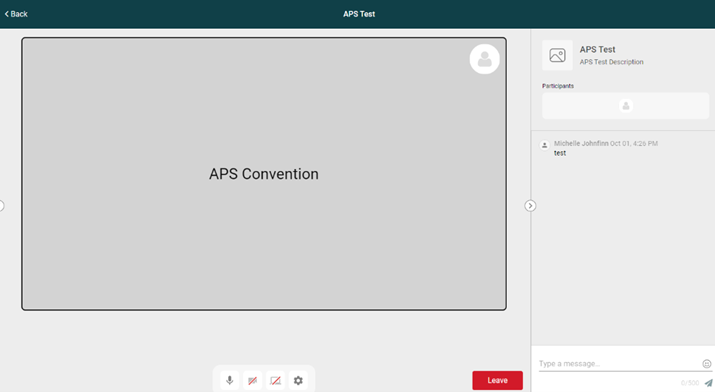
6. You will see yourself as a moderator in the top left-hand corner of your screen.
7. Please note the chat feature in the bottom right corner, where attendees may ask you questions.
Sharing Your Screen
1. To display any presentation materials to attendees you must share your screen. Click on the third button from the left to do so:

Once you click the Share Screen button, the following screen will pop up. You can share: a Chrome Tab, Window, or your Entire Screen.
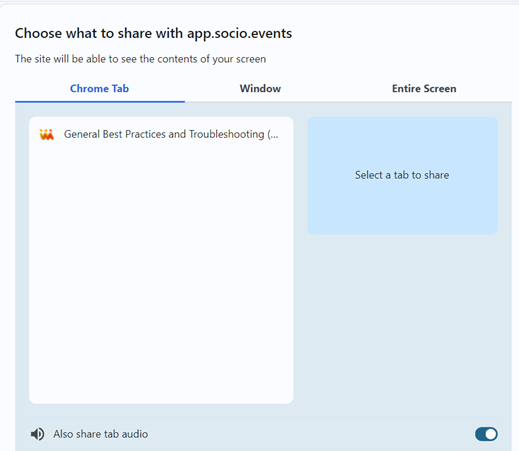
You can also share tab audio, as shown here:

Please ensure you click Share at the bottom right corner of the pop-up tab:

Lastly, please keep an eye on the time throughout your Roundtable Session to ensure that there is enough time for attendee discussion. Roundtable sessions are 45 minutes in duration and will automatically close at the end of your time slot.
Poster Presenters
Please refer to the personal email you received from [email protected] that includes the poster link to upload your poster materials as well as information on how to upload. Please upload your poster information by Friday, October 17, 2025, at 5:00 PM EDT (21:00 UTC).
To support global participation, all posters will be available on-demand throughout the 2025 APS Global Psychological Science Summit event days, October 21-23, 2025. Poster presentations are not scheduled or presented live, but rather available for attendees and fellow presenters to view and engage within the online platform.
Global Summit attendees will be able to view posters and interact with your poster presentation at any time. Attendees can leave comments or questions via text chat, and you can reply at your convenience.
Attendees are encouraged to view posters during scheduled Networking Hours in the program schedule. Please view the full event schedule on the Program-at-a-Glance webpage, along with Plenary Sessions information on the Featured Speakers webpage.
All poster presentations are organized by subject area, with each subject area having its own dedicated feature in the event platform. There are 16 poster features, listed alphabetically for easy navigation:
- Posters – Bio Psych
- Posters – Clinical
- Posters – Cog Neuro
- Posters – Cog Sci
- Posters Cross Cultur
- Posters – Cultural
- Posters – Development
- Posters – Experiment
- Posters – I-O Psych
- Posters – Lifesp Dev
- Posters – Methodolog
- Posters – Neuroscien
- Posters – Perception
- Posters – PersonEmot
- Posters – Political
- Posters – Behavior
- Posters – Social
- Posters – Other
- Posters – Teaching
To view posters, use the left-hand navigation in the event platform and select the subject area(s) that interest you.
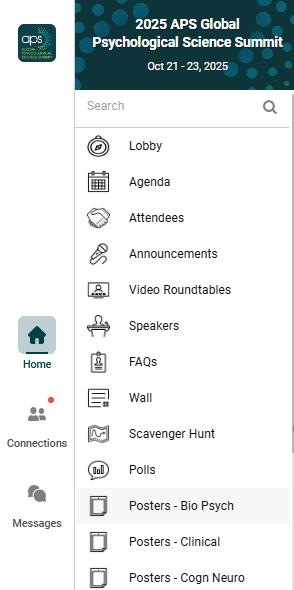
Once in a Poster Feature, you can use the Search function located in the top of the Poster section (shown below) to find a specific poster by keyword or title. Note that this search function will only search the posters within this subject area. Learn more about using the search, filter, and favorites functions on the Using Search, Filter, Favorites, and Notes webpage.

Once you find your poster, click on “Visit”. There you will be able to view your poster as well as any messages in the chat from other Global Summit participants. Please adhere to the APS Code of Conduct while discussing your research with fellow attendees.