Navigating Posters
To support global participation, all posters will be available on-demand throughout the 2025 APS Global Psychological Science Summit event days, October 21-23, 2025. Poster presentations are not scheduled or presented live, but rather available for attendees and fellow presenters to view and engage within the online platform.
Global Summit attendees will be able to view posters and interact with your poster presentation at any time. Attendees can leave comments or questions via text chat, and you can reply at your convenience.
Attendees are encouraged to view posters during scheduled Networking Hours in the program schedule. Please view the full event schedule on the Program-at-a-Glance webpage, along with Plenary Sessions information on the Featured Speakers webpage.
How Posters Are Organized
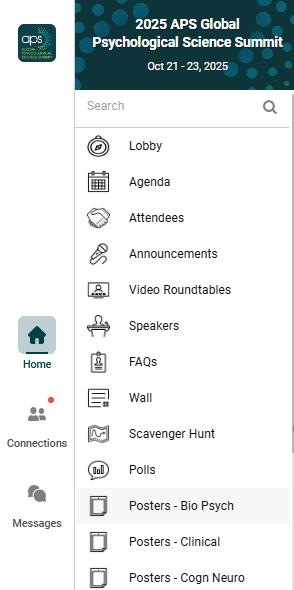
All poster presentations are organized by primary subject area, with each subject area having its own dedicated feature in the event platform. There are 16 poster features, listed alphabetically for easy navigation:
- Posters – Bio Psych
- Posters – Clinical
- Posters – Cog Neuro
- Posters – Cog Sci
- Posters Cross Cultur
- Posters – Cultural
- Posters – Development
- Posters – Experiment
- Posters – I-O Psych
- Posters – Methodolog
- Posters – Lifesp Dev
- Posters – Neuroscien
- Posters – Perception
- Posters – PersonEmot
- Posters – Political
- Posters – Behavior
- Posters – Social
- Posters – Other
- Posters – Teaching
To view posters, use the left-hand navigation in the event platform and select the poster feature that interests you.
Searching Posters
Each poster feature allows you to:
- Scroll through all posters within that subject area.
- Use the search bar at the top of the section to find posters by keyword or title.
- Favorite posters by clicking the star icon next to each listing.
- To search across all posters and the entire program, use the Search bar at the top of the left-hand navigation menu.
- Learn more about using the search, filter, and favorites functions on the Using Search, Filter, Favorites, and Notes webpage.

Favoriting Posters
Favorite posters by clicking the Star icon in the upper right-hand corner on each listing. This allows you to easily return to the item later in your personalized schedule or saved list.

To view your Favorited Posters within each poster subject area, click on the Filter Icon and the below screen will appear.

Your Favorited Posters will be totaled as shown below. Click Apply Filters to view your Favorited Posters.
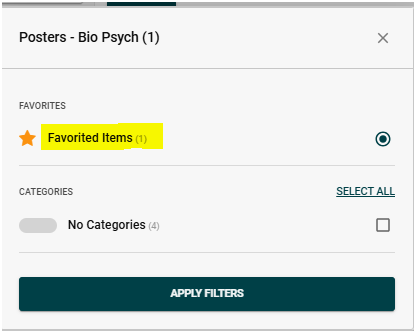
When the “Favorited Items” filter is applied, you will see “ON” in the top right-hand corner.

Click “ON” to remove the “Favorited Items” filter, then click on Select All. Finally clicking Apply Filters to return to the Poster Feature with all posters displayed.
APS Code of Conduct
Please be aware of the APS Code of Conduct while navigating the online platform.