Agenda and Live Streaming Sessions
The Agenda feature is a central place for attendees to access a schedule of sessions and add them to their personal agenda. Using the Agenda feature, attendees can review session details and related content, like speaker profiles. The agenda becomes the vehicle for navigating and attending the plenary panel sessions, workshops, and video roundtable sessions.
The Agenda feature allows you to browse the scheduled sessions and plan your Global Summit experience.
APS is committed to ensuring that the 2025 Global Psychological Science Summit is fully accessible to all persons. Please visit the Accessibility webpage to learn more.
Adding to Your Personal Agenda
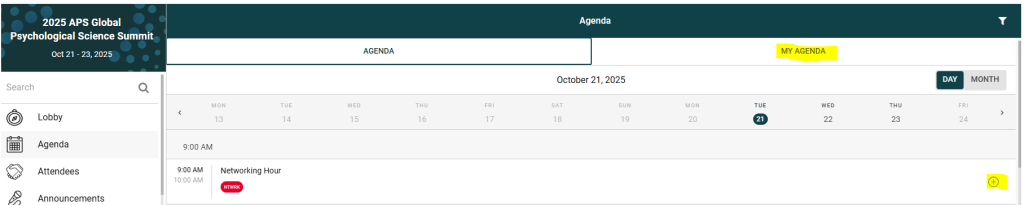
1. Click on the Agenda section from the left-hand navigation.
2. Above the date section, you will see Agenda and My Agenda.
3. The ‘My Agenda’ tab shows the list of Sessions that you have added to your personal agenda.
4. To add a session to your personal agenda, simply tap the plus (+) icon next to a session.
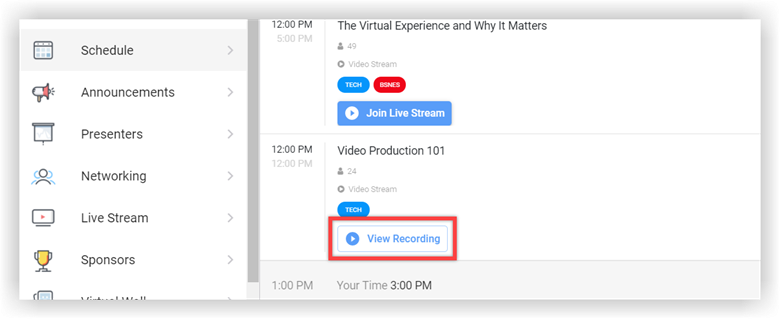
5. At the scheduled time, please click on Join Live Stream and the stream will play automatically.
Plenary Panel and Workshops Overview – Live Stream
1. Plenary Panel sessions and Workshop sessions will be delivered via Live Streaming.
2. To access these sessions, go to the Agenda section in the left-hand navigation, and click on a Plenary Panel session or workshop session.
3. At the scheduled time, please click on Join Live Stream and the stream will play automatically.
4. Each session contains the titles, abstracts, and speaker information for the session, and the chat feature. On the online platform, a session with a live stream shows a video panel above the details section. A collapsible panel on the right shows the chat feature for the session.

5. To participate in the chat feature, attendees simply click the relevant tab in the panel on the right.
6. After the live stream is over, the recording will be added to the session for attendees to access, view on-demand, and continue to chat.